I don’t think it’s supposed to be fused to the brim. From what it looks like in OrcaSlicer. So I can make it a little farther, another 0.02. Will later.
That might get gaps in some spots though. Cause it’s the right distance probably in one spot, from the brim. Or that’s a gap, but it might supposed to have a gap there. The brim isn’t part of the print.
I think the offset is right, the blobs are for some other reason. I increased the temps, and got rid of the gap. 95C bed, and 255C nozzle.
Need to check the nozzle, to see if it’s tight enough, when it’s hot.
If that isn’t the problem, then a slicer setting, or the filament needs to be dried.
Or use pressure advance, maybe that works now. I should do flow rate first, but I think that’s fine, as any less it’s worse.
Going to try Pressure Advance, even though flow rate isn’t calibrated with it. Default might be fine.
Not sure there’s enough blobs for nozzle to not be tight enough. I did do it cold, but with a socket wrench. You can’t make it too tight, I think the block is copper on mine. Also, you’ll break it. I learned the hard way.
Current bed mesh:
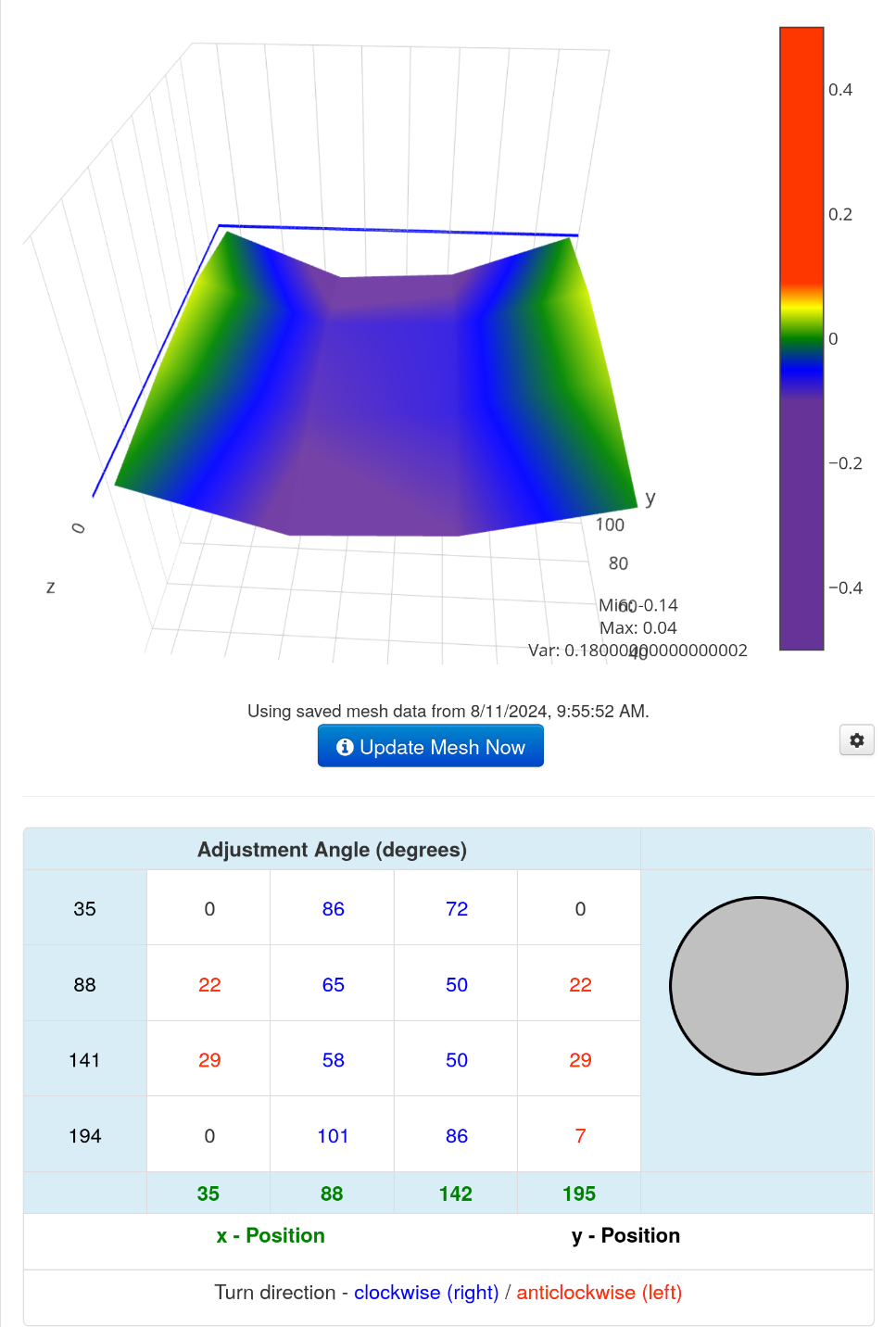
Only one corner off, only by 0.01.
Pressure Advance has gaps. But I doubt the offset is the cause. More like the filament, and temps. Can’t increase bed temp much though. Remember it turns into glass. Also it prints too fast.
When it stops, it leaves a blob, and you can’t tell which line is good. They all suck.
Going to use a different one. It can print smaller things better at my temps and the ASA I’m currently using.
Guess I have to do flow rate first. Not sure that’ll fix gaps in the line Pressure Advance though.
The nozzle should be as tight as it can be. Unless you want to break something. Replaced the sock too, it was messed up.
What’s the point in calibrating this filament? Gonna run out, and don’t have anymore of this filament. I have a different brand of white ASA. Don’t know if the flow rate is the same for different filament. Different materials make the flow rate different. Bummer, different brands, probably means different material, they don’t use the same recipe.
Or print Z calibration with Cura.
Testing Cura, cause flow rate calibration takes almost two hours.
Hmm, Cura is printing @ 0.2, instead of 0.3. I set the Z offset to 0.1 in OrcaSlicer, not sure how to change in Cura. If there’s less blobs, then change OrcaSlicer to 0 and try one last time.
If that doesn’t fix OrcaSlicer, it ain’t worth anymore time.
Does auto leveling or fading make the offset touch the bed even if you got it with a 0.1mm feeler gauge?
Looks like the blobs are more, and not in the same spot. Should print at 0 offset with OrcaSlicer to see if it looks the same or better.
Hmm, Z offset should be -0.1 not 0.1 in OrcaSlicer, if it is 0.1mm far from the bed. 0.1 would be closer. So I did it wrong. So 0.1 is 0.2 on the printer. No wonder I get gaps, at farther away offsets on the printer.
If in Bed Visualizer, all the corners are 0 or close to 0, does that mean you have the right offset on the printer? Cause I don’t want to check it. Might be too close with -0.1. It can probably be farther away now. I’ll just hope for the best.
Probably not too close, cause of gaps in Pressure Advance. Except, that was set to 0.1, not -0.1. So either 0 or -0.1 should work. It’s printing at 0.20. So it shouldn’t be baked on it, as that’s what Cura was printing at. Did I forgot to upload the -0.1 one? Changed wrong setting, canceling it. Put -0.1 in nozzle volume, not what I wanted to do, no idea what that does.
Will probably check Z offset before printing again.
At 0.1 after adjusting the Z offset, a 0.2 feeler gauge is tight. Seems too tight, and at all the offets I tried. But when using Live Adjustment, it got a lot looser for 0.1 @ I assume 0.
Seeing what the bed mesh looks like before I print. Hmm, if 0 works, maybe I should just set the offset to -1.98, if I want -0.1 in OrcaSlicer. Except, it’s pretty loose at whatever it’s at. Except for 0.2, almost lift the hotend up trying to get feeler gauge under it @ 0.1 which should be 0.2. Unless homing the Z doesn’t set it to 0. I was right, probably too close. Already blobs. Maybe just set it to -0.2, and set the Z offset using 0.2 feeler gauge. 0.04 at least too close.
The var went down to 0.16, lowest so far.
It’s easier to get 0.1mm then 0, you can’t put anything under 0, and if it’s too close, you won’t know until you print. I wonder what Z they say it needs to be tight at, or they aren’t using a 0.1mm feeler gauge.
My method might be better, I check 0.1 to make sure 0.2 fits under it. That’s if using a wrong offset. That is 0 != 0. Will it really be zero if it’s tight with Z @ 0.1 and a 0.1 feeler gauge? Not sure it really matters. It doesn’t print at 0, unless I print at 0.1. Which I won’t.
According to tune menu, it’s -1.82 or so, almost done. No idea how that’s right, at -1.90, I might have been able to get 0.2 under it.
Something I read said to put 0 in your software, I assume slicer. but I’m doing better, getting rid of Unified Firmware 2, it ain’t worth anymore time. Even when it was 0, it was having issues, I suppose I could try one last thing, use 0. But Marlin might have new features, and be less buggy. But I am lazy, so I’ll try setting the offset with a feeler gauge, and setting slicer to 0. If it doesn’t work good enough, I’m ditching Unified Firmware 2. TH3D might be ran by one guy or something, that likes Trump, based on the Trump statue they printed out. Another reason not to use their firmware.
Apparently it works better with their auto leveling sensor. So Marlin might fix the bed up even more. Better look it up and see how much I need to modify to make it work. Might be worth it in the long run.
Almost the moment of truth, can you easily set the right offset with Unified Firmware 2? Running Bed Visualizer first.
Not hard to compile, I followed basically no instructions, and got it to compile. Do I need to flash the screen? Still haven’t started the print yet. I copied the settings I remembered changing to the new config from the examples. No idea if it’ll work or not.
One more try @ -1.96. If I recall, that was a good offset before, and the Tune menu got that value. But if the Z offset is changing per auto leveling run, then it won’t be good, and off to Marlin I go. Just copied my bed PID to the configuration.h file, so I don’t have to do that again. In case this doesn’t work, I have no confidence it will.
Hmm, I thought the var was 16 at -1.96. It’s 17 now, but all corners are exactly 0.
Even if it does work, I should flash Marlin, and use the same offset, and see what it does. I just configured it with the ProUI. I don’t want the Pro firmware, not sure they provide an archive of the source code, with the config for my printer. Also, it’s based on Marlin.
I used a lot of filament trying to get offset right. The other reason to switch to Marlin. Maybe it’s easier.
Six years ago, somebody said Unified Firmware 2 is like Apple, and Marlin is like Android. In that case, I should stick with the possibly a Trump supporter’s firmware. Android is crap.
You can’t get it working quickly with the config example? That means it won’t work then.
Klipper sounds like the best option, the Orange Pi would power it, not the printer’s crappy crap. Assuming my Orange Pi Zero 2 or whatever it is, is good enough.
And looks close enough so far. How many blobs will be on it though? I’ll flash Marlin because of blobs, that might be filament or slicer related. Just enabled all the things it warned me about, said it recommended enabling a bunch of stuff in Marlin. Now I might really switch to it. Unified Firmware 2 didn’t say anything about that stuff. Might be enabled by default though.