The magnet is as weak as the printers, at least with the build plate I use.
It’s a build plate from HoldenEnterprises.
It’s actually worse then the ones that came with a cheap build plate on Amazon. I kept em, and should have just used one.
I can always take it off, maybe. Or put one on top of it. Lose even more height.
Damn, need to run AutoBim again. Not sure how well I aligned the magnet base.
Or did the bed move while it was leveling? That would be worse then the bed on printer.
I was seeing if it attached was any better, still weak.
Must only work for their build plates, in that case, they’d work fine without it on my printer. The one I have is spring steel I think too.
Ok, it has one good use, makes it easier to level bed. Even if you don’t put it on perfectly. Got to get the right Z offset again, probably not right after adjusting AutoBim, mesh isn’t as good as I’d like.
Offset should be fine, another AutoBim with even better accuracy.
Had to change to 0.02 accuracy, almost what the default is, I think the default is 0.01.
If this doesn’t look good, changing Z to 0, and changing a setting in Bed Visualizer. Well and AutoBim. And loosen knobs before running it again. Not sure the setting in Bed Visualizer matters that much.
The bed must be warped, and just a G10 build plate doesn’t fix it. But a magnetic base does. Is my offset 0 now? Running Bed Visualizer to see what it looks like now.
I have an Ender 3 V2 Neo.
Nope not 0.
Doesn’t even bed out, just makes AutoBim work better, except for Bed Visualizer. Now both sides are a slope down.
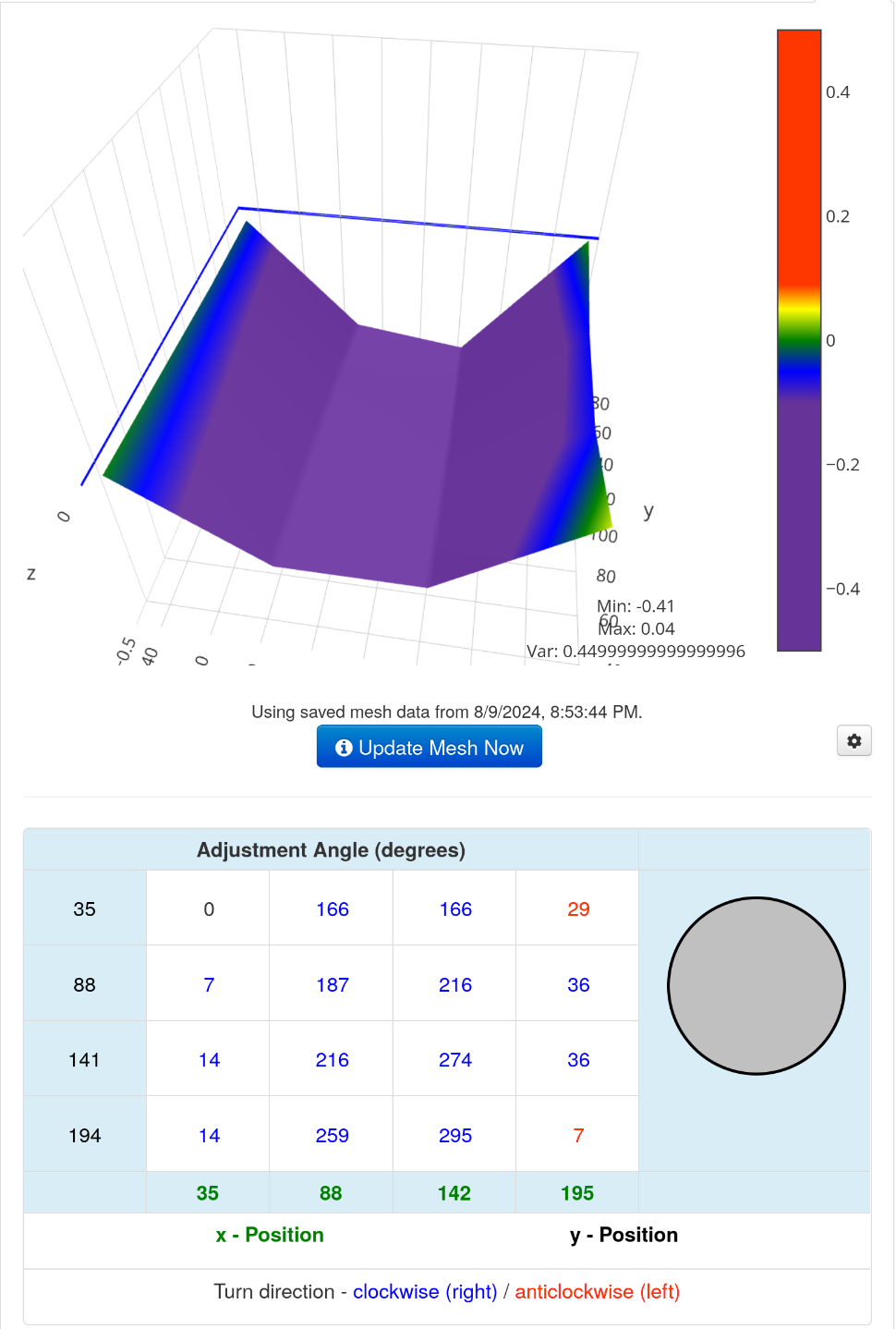
So AutoBim with better accuracy works better, but the mesh sucks. Still waiting 15 minutes to print, no idea if it can.
Z offset not close enough.
What it looks like now:
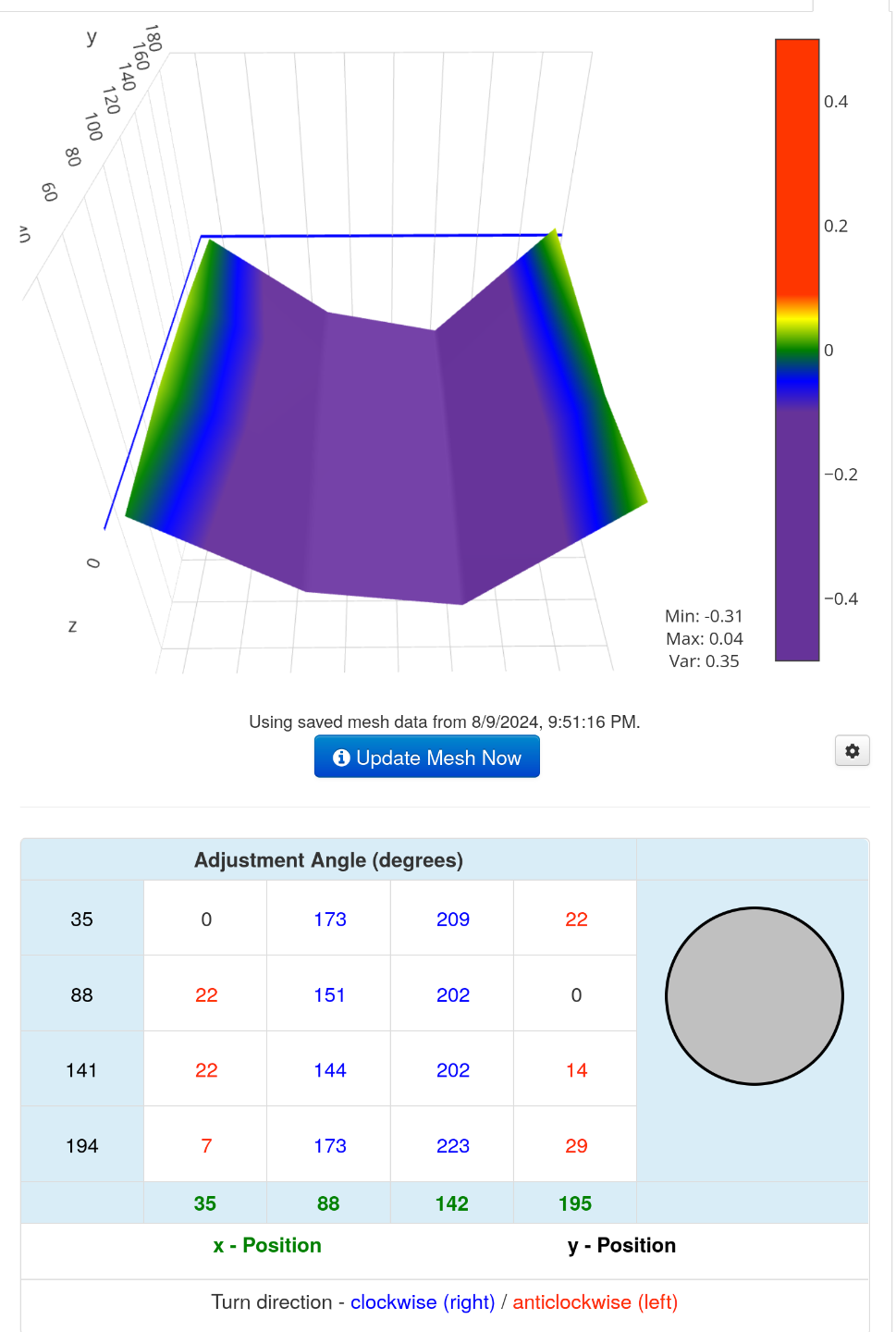
The corners are green, but then it dips down.
So the bed is more warped now? Might be better off removing the damn magnetic base.
This bed does the opposite. They didn’t enable UBL. Not my problem, that’s enabled.
Here you go, looks like the auto leveling sensor should solve that problemo. The keyword is should.
Maybe you do have to put it on perfectly, good luck, I had to partly remove it multiple times, until it was almost perfect, might not touch the back all the way.
Let me guess, the offset is still -2.11 or so. Don’t want to risk being too close, so I’ll try -2.06 first. If that’s not close enough, I’ll just check the damn thing again. Maybe wait for printer to cool down, and remove magnetic base, if I can.
Instead of checking it, I’ll just try -2.11. Cancel if it looks way too close. I’m lazy, and sick of waiting 15 minutes. But it’s probably the same as before, somehow. Even though I put a magnetic base on it, and changed the leveling knobs.
Extruder might have been clicking, that means too close, probaby under extrusion caused gaps. Guess I’ll try -2.08. -2.06 was almost close enough.
And -2.06 must have been right, cause -2.08 makes it click too. So -2.06 or -2.07. Or I can’t set it on the printer’s interface, if it’s -2.06x or something.
I think the offset was always too close. At least when extruder was making noise. You can still get gaps, under extrusion, if the nozzle is too close, not enough filament will make it out.
Extuder wasn’t making clicking noise. It’s the filament I think hitting the hole in enclosure. Or the dust/lube filter, that has no lube in it right now probably. Need a longer tube going from dry box. Just using Tune menu and hoping for the best. Got to go to bed soon. Down to -2.12.
After it prints, if good, I’ll run Bed Visualizer again @ -2.12. To see if it’s better looking.
Gaps means Z offset probably not close enough, unless extruder is clicking, then it might be too close and under extrusion. Or something else is wrong with extruder.
Maybe the cause of blobs @ -2.12 was because it was leaking while tilting the mesh. Not done yet. Looks like blobs, damn. I think -2.11has gaps.
Turned Z hop off, can’t reprint until later. Got to go to sleep.